Role: UI Designer & UX Consultant Year: 2018-2020
Project Overview
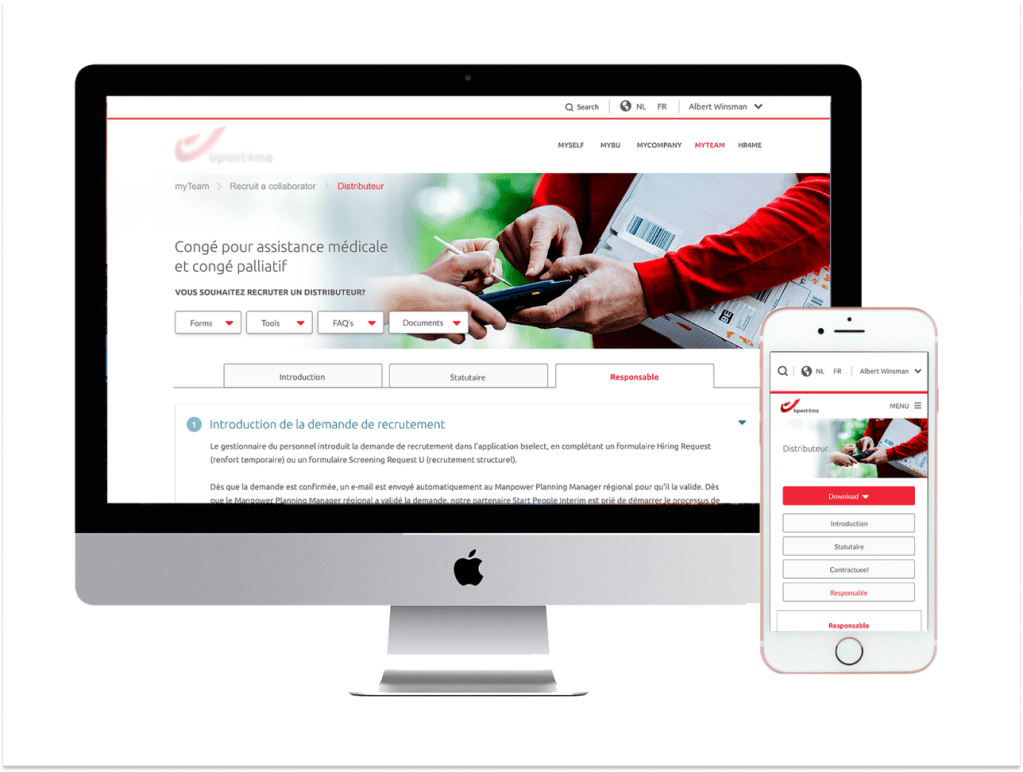
As a UI Designer and UX Consultant, I lead various sub-projects aimed at enhancing digital experiences for one of Belgium’s largest civilian employers. That involved migrating the intranet portal, designing iOS and Android mobile applications, and digitizing work forms to streamline processes and improve accessibility
My Contributions
- Engaged in detailed discussions and meetings with the client to grasp their project vision, goals, and expectations
- Leveraged expertise in UX/UI principles to conceptualize design solutions involving ideation, wire-framing, prototyping, and iterative refinement
- Collaborated closely with the development team, providing comprehensive support to ensure smooth implementation of design solutions. This involved clarifying design specifications, addressing queries, and offering guidance throughout the development lifecycle
The Business Problem (Why)
The company was migrating legacy content into a new system. The technical constraints were strict: layouts and page structures couldn’t change drastically. My role was to modernize the intranet experience visually and improve usability within these limitations
Design Process
1. Target Users (Who)
- Internal employees who used the intranet daily for company information and tools
- HR/admin teams needing structured navigation to publish content
- General staff relying on intranet updates across departments
2. Understand Customer’s Context (When & Where)
- When: Primarily desktop-based (in offices)
- Where: During the migration process, where navigation and clarity were critical to avoid confusion
3. Key Features (What)
- Modified UI for the intranet portal (visual hierarchy, color scheme, typography)
- Improved content findability with better information grouping and navigation structure
- Responsive layouts to support future scalability
4. Design Approach & Activities (How)
| Activity | My Contribution |
|---|---|
| Stakeholder discussions | Understood constraints of data migration and legacy content |
| Heuristic review | Identified usability issues in navigation and layout |
| Information architecture refinements | Proposed restructuring content around tasks rather than legacy labels |
| Visual redesign | Delivered updated, accessible UI designs in line with corporate branding |
| Developer support | Offered active support during the deployment phase to resolve any design-related issues and ensure a successful transition to the live environment |
5. Outcome & Impact
- Improved navigation and content findability during the migration process
- Delivered a modernized, WCAG-compliant intranet UI despite technical limitations
6. Measure Success (How)
- Content findability → Reduction in employee complaints about “can’t find respective Forms” after migration (tracked via helpdesk tickets)
- Task efficiency → Faster access to key pages and resources (measured via internal feedback surveys)
Mobile App Design for Employee Leave Management
Project Type: Native iOS & Android Mobile App | Role: Visual & Interaction Designer
The Business Problem (Why)
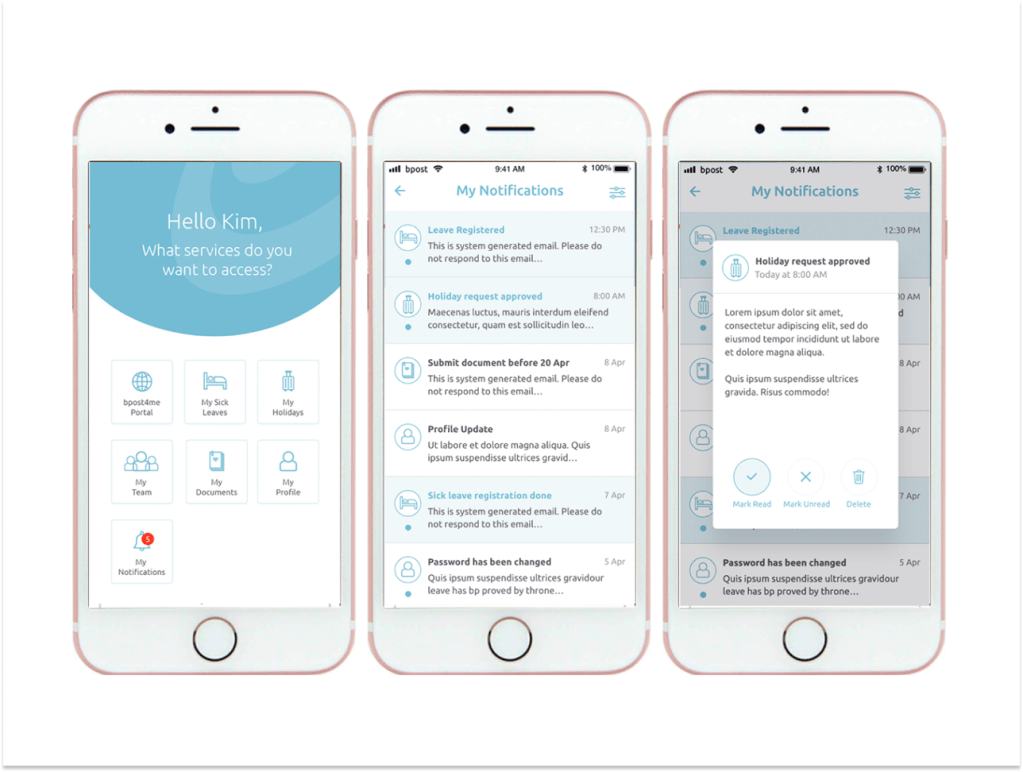
The organization wanted to digitize its leave management process, which was previously manual and paper-heavy. I was tasked with designing a mobile-first app that would simplify leave requests, approvals, and tracking for employees and managers
Design Process
1. Target Users (Who)
- Employees requesting annual/sick leave
- Managers/HR approving and tracking requests
2. Understand User’s Context (When & Where)
- When: On-the-go: staff submitting requests outside the office
- Where: HR teams managing approvals quickly via mobile devices
3. Key Deliverables (What)
- Complete mobile UI for leave management workflows (apply, track, approve)
- Prototypes for iOS and Android
- Visual assets & interaction guidelines for development handoff
4. Design Approach & Activities (What & How)
| Activity | My Contribution |
|---|---|
| Requirement workshops | Identified must-have features (leave request, approval, notifications) |
| Competitive scan | Benchmarked HR leave apps to extract best practices |
| Wireframing & flows | Designed request/approval workflows step by step |
| High-fidelity design | Created modern, branded UI for both iOS & Android |
| Interactive prototyping | Built click-through prototype to demo for stakeholders |
| Developer collaboration | Supported handoff and addressed implementation challenges |
5. Outcome
- Delivered a mobile-first app that simplified leave requests and approvals
- Reduced paperwork and manual errors through digitization
- Employees gained a faster, more transparent workflow to track leave balances
6. Measure Success (How)
- Process efficiency → Reduced time to submit and approve leave requests (compared to old manual process)
- Adoption rate → Number of employees/managers actively using the app within first few months
Project Learnings
As a UX/UI designer involved in multiple projects for the same client, I learned the importance of understanding user needs and adapting to technical constraints. Accommodating localization considerations and embracing an iterative design process were crucial aspects of both projects. Additionally, effective collaboration and communication with clients, development teams, and stakeholders were essential for success.
 Snehal Kank